Credit card bill payment
How to set up automatic credit card bill payments.
How to set up automatic credit card bill payments.
Automatic payments from Vancity chequing accounts are easy and free. You can choose to make just the minimum monthly payments, or to pay each month’s bill in full. Not a member? You can set up automatic payments for the minimum payment amount from any chequing account. If you’re looking to set up automatic payments with your service provider, please contact them directly about payment methods.
If you have a Vancity chequing account, follow these steps to set up a free automatic payment on your Vancity enviro™ Visa* online.
- Login to Manage my Visa Card.
Access secure messages.
In the “I want to…” drop-down menu select “Access secure messages”, then on the secure messages page, select the “Create new message” button.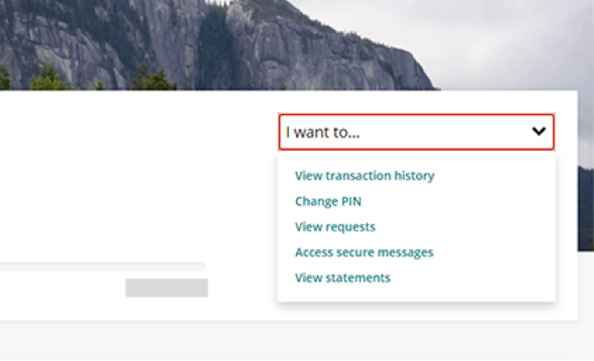
Create a message.
In the “Category” drop-down menu select “Automatic payments”
In the “Reason” drop-down menu select “Set up”.
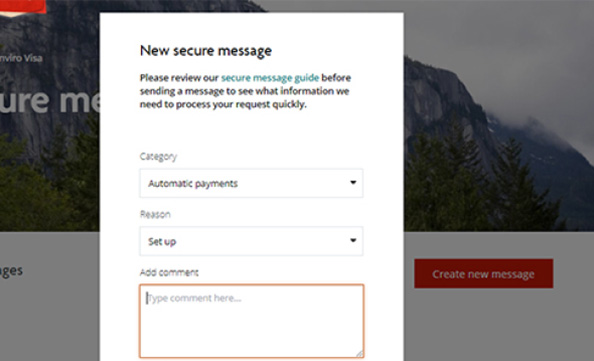
- Add comment.
In the “Add comment” section please supply the following information:
• Your preferred payment option: Minimum monthly payment or Full payment
• Your 12-digit Vancity chequing account number.
How to find your account number - Select the “Submit” button.
- Confirmation.
You’ll receive a confirmation message and email (which will include your request’s confirmation number) shortly after of submitting the message.
We’ll respond to your request within 2 business days, and you’ll receive an email notification when our response is ready for you to review.